
GPS Logger Lite2.0 - Google Play
You'll be able to see results in few seconds.
Publisher Description



GPS Logger - A lightweight tool for your location logging needs!
GPS Logger Lite is a simple,easy to use but an app with high capabilities. This app can record your locations automatically with high precision into a easy to access database in intervals without you having to take off your eyes from the road or check back on your device for a long duration.
Please check out the Pro version here :
https://play.google.com/store/apps/details?id=com.warpcode.gpsloggerpro&hl=en
Allows you to export your data in KML format (.kml) into your SD card which is supported by Google Maps/Earth/ArcGIS for plotting. You can also export in PDF format if you want to keep a record in a readable manner.
We used programming techniques to minimize the load on your GPS for optimized power management. (This app has been tested on a Google Nexus 7 to give 12 continuous hours of recording data before draining the battery).
PLEASE CHECK OUT OUR PRO VERSION FOR MANY MORE FEATURES:
https://play.google.com/store/apps/developer?id=Ideacabin
FOLLOW US HERE:
https://www.facebook.com/IdeaCabin
***Essential Features***
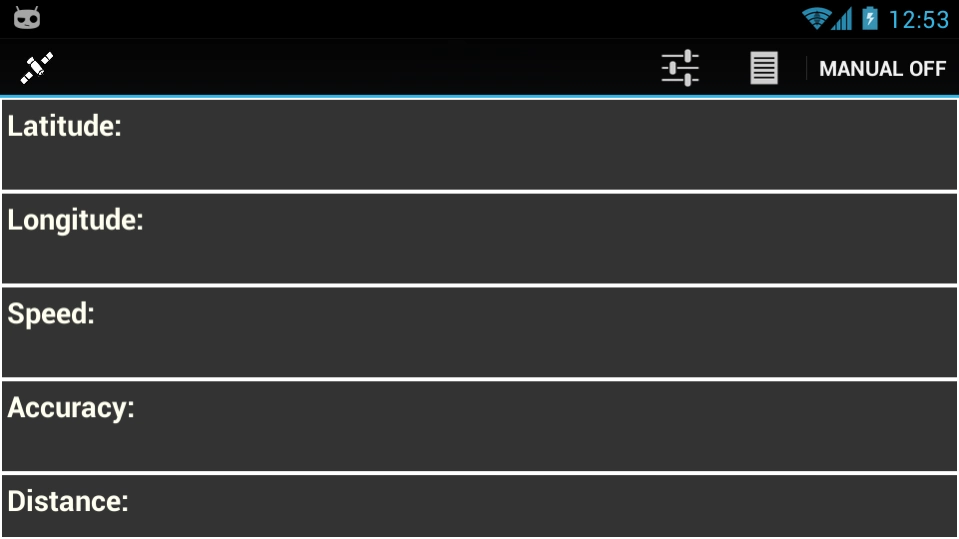
1. Displays real time GPS data and Speed and Distance in a high contrast for viewing purposes in sunlight.
2. Records your Latitude, Longitude, Speed (in km/hr or miles/hr) and accuracy of your data in meters.
3. It has two substantial modes to choose between for your needs - Interval and manual.
Interval mode - records your locations constantly in an interval set by you.
Manual mode - records your instantaneous location at the press of a button.
4. Easy to navigate database with flexible options provided to edit the data recorded.
5. Exports your data in .KML and .PDF formats to your SD card.
6. Cloud options - Google Drive.
About GPS Logger Lite
The company that develops GPS Logger Lite is Ideacabin. The latest version released by its developer is 2.0.
To install GPS Logger Lite on your Android device, just click the green Continue To App button above to start the installation process. The app is listed on our website since 2013-10-19 and was downloaded 0 times. We have already checked if the download link is safe, however for your own protection we recommend that you scan the downloaded app with your antivirus. Your antivirus may detect the GPS Logger Lite as malware as malware if the download link to com.warpcode.gpsloggerlite is broken.
How to install GPS Logger Lite on your Android device:
- Click on the Continue To App button on our website. This will redirect you to Google Play.
- Once the GPS Logger Lite is shown in the Google Play listing of your Android device, you can start its download and installation. Tap on the Install button located below the search bar and to the right of the app icon.
- A pop-up window with the permissions required by GPS Logger Lite will be shown. Click on Accept to continue the process.
- GPS Logger Lite will be downloaded onto your device, displaying a progress. Once the download completes, the installation will start and you'll get a notification after the installation is finished.
Program Details
System requirements
Download information
Pricing
Version History
version 2.0
posted on 2013-10-20
Version 2.0
*Improved UI and crashes Gingerbread and ICS devices.
*Changed theme to black. Power saving for AMOLED devices.
*Added very accurate algorithm to calculate distance traveled.
*Now you can plot even when the app is not running , in the background.
*Sharing via Google Drive , KML and PDF.
Disclaimer
Official Google Play Link
We do not host GPS Logger Lite on our servers. We did not scan it for viruses, adware, spyware or other type of malware. This app is hosted by Google and passed their terms and conditions to be listed there. We recommend caution when installing it.
The Google Play link for GPS Logger Lite is provided to you by apps112.com without any warranties, representations or guarantees of any kind, so access it at your own risk.
If you have questions regarding this particular app contact the publisher directly. For questions about the functionalities of apps112.com contact us.
